Keap Alternatives: 5 Best CRMs for Service Businesses in 2026
Keap too expensive or complex? Compare the 5 best Keap alternatives for freelancers and service businesses in 2026, including pricing, features, and honest pros and cons.
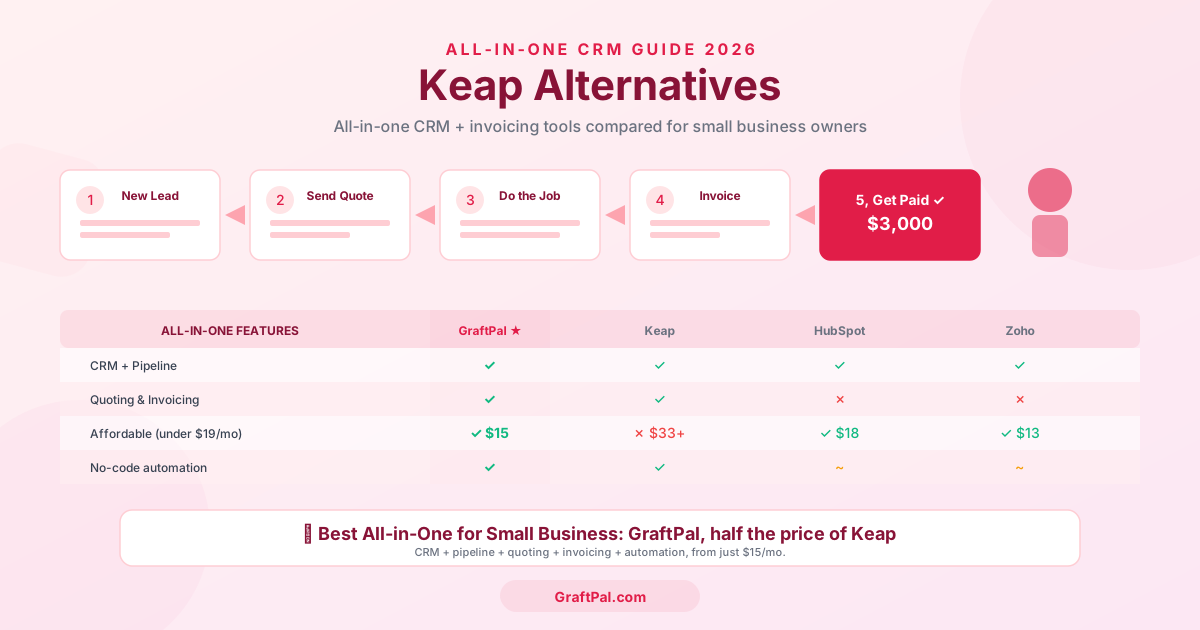
If you have ever searched for a CRM that combines contact management, marketing automation, invoicing, and e-commerce in one dashboard, Keap (formerly Infusionsoft) has probably appeared near the top of your list. On paper it sounds ideal, especially for service businesses that want to eliminate the patchwork of separate tools. In practice, however, many freelancers, consultants, and small-business owners discover that Keap's complexity, cost, and e-commerce-centric design create more friction than they solve.
Below we break down why teams leave Keap, compare the five strongest alternatives side by side, and explain which CRM deserves the top spot for service businesses heading into 2026.
Why Service Businesses Look for Keap Alternatives
Keap has a loyal following among info-product sellers and e-commerce entrepreneurs, but service businesses run into a recurring set of frustrations:
Price shock. Keap's Pro plan, the tier most businesses actually need, starts at $249 per month for only two users. Adding extra users costs $29 each. For a five-person service team the annual bill exceeds $4,500 before you have sent a single email campaign. The entry-level plan is cheaper but strips out so many features (no sales pipeline, no A/B testing, limited automations) that most teams outgrow it within weeks.
Clunky, dated interface. Keap's UI feels like a product that has been bolted together over fifteen years, because it has. Critical workflows such as building an automation, editing a landing page, and viewing a contact timeline each feel like they belong to different applications. Newer users regularly report a steep learning curve and a reliance on Keap's paid onboarding sessions (starting around $499) just to get the basics running.
Aggressive upselling. Free-trial users and lower-tier subscribers are frequently nudged toward premium add-ons, advanced automation packs, and one-on-one coaching bundles. Community forums are filled with complaints about unexpected price increases upon renewal.
E-commerce bias. Keap's feature roadmap prioritises shopping carts, order forms, product upsells, and subscription billing, perfectly reasonable if you sell digital courses or physical products, but largely irrelevant if you are a freelancer, trades professional, photographer, or consultant who bills by the project or by the hour.
Over-engineered automation. Keap's Campaign Builder is undeniably powerful, but most SMBs only need simple "if this, then that" sequences, send a follow-up email three days after a proposal, remind a client about an unpaid invoice, notify the team when a deal moves stage. The Campaign Builder's drag-and-drop canvas, with its goals, sequences, timers, and decision diamonds, is overkill for those use cases and takes hours to configure correctly.
If any of that resonates, keep reading. The five alternatives below each solve one or more of Keap's pain points, and the first option on the list solves all of them.
Quick Comparison Table
| Feature | GraftPal | HubSpot CRM | Capsule CRM | Pipedrive | Monday CRM |
|---|---|---|---|---|---|
| Starting price | from ₹2,499/mo | Free (paid from $20/mo) | Free (paid from $18/user/mo) | $14/user/mo | $12/seat/mo |
| Pipeline management | ✓ | ✓ | ✓ | ✓ | ✓ |
| Proposals & e-signatures | ✓ | ✗ (add-on) | ✗ | ✗ (add-on) | ✗ |
| Invoicing & payments | ✓ | ✗ (add-on) | ✗ | ✗ | ✗ |
| Scheduling & booking | ✓ | ✓ (paid tier) | ✗ | ✓ (add-on) | ✗ |
| Workflow automation | ✓ | ~ (limited free) | ~ (paid only) | ✓ (paid tier) | ✓ |
| Email integration | ✓ | ✓ | ✓ | ✓ | ~ |
| Reporting dashboards | ✓ | ✓ | ~ | ✓ | ✓ |
| Built for service businesses | ✓ | ✗ | ~ | ✗ | ✗ |
| No annual lock-in | ✓ | ✗ | ✓ | ✗ | ✗ |
1. GraftPal, Best All-in-One Keap Alternative for Service Businesses
GraftPal was designed from day one for freelancers, service providers, and SMBs, the exact audience Keap claims to serve but frequently frustrates. Where Keap bundles CRM with e-commerce tools most service teams never touch, GraftPal bundles CRM with the tools service teams actually use every day: proposals, e-signatures, invoicing, online payments, scheduling, and workflow automation.
Why GraftPal wins for service businesses:
- One predictable price. from ₹2,499/mo. Compare that to Keap's $249/mo Pro plan and the value gap is staggering.
- Proposals with e-signatures built in. Create branded proposals in minutes, send them for electronic signature, and convert accepted proposals into invoices with one click. Keap has no native proposal or e-signature feature, you need a third-party tool like PandaDoc or DocuSign.
- Invoicing and online payments included. Generate invoices, accept card or bank-transfer payments, track outstanding balances, and send automatic payment reminders, all inside the same platform where you manage your pipeline. Keap offers invoicing only on higher tiers, and its payment processing is geared toward product sales rather than service billing.
- Scheduling and booking. Share a booking link, let clients pick a time, and sync everything with your calendar. No need to bolt on Calendly or Acuity.
- Clean, modern interface. GraftPal's UI is intentionally simple. New users are productive within minutes, not weeks. There is no $499 onboarding fee, because you do not need one.
- Workflow automation that fits SMBs. Automate follow-ups, status-change notifications, reminders, and handoffs with a straightforward rule builder. No campaign canvases, no decision diamonds, no three-hour setup sessions.
- Purpose-built for service verticals. Whether you are a coach, an agency owner, a beauty professional, or an events planner, GraftPal's templates and workflows are built around how you actually work.
Explore the full GraftPal platform or start your free trial.
2. HubSpot CRM, Best Free Starting Point with an Upgrade Path
HubSpot's free CRM is legitimately generous: unlimited users, up to one million contacts, deal tracking, email templates, and a meeting scheduler. For solo operators who only need basic contact and deal management, it is hard to argue with the price.
Where HubSpot shines:
- The free tier is one of the most feature-rich in the industry.
- The ecosystem of Sales Hub, Marketing Hub, Service Hub, and Operations Hub means you can scale into enterprise-grade tooling if your business grows dramatically.
- Excellent educational resources (HubSpot Academy) and a massive integration marketplace.
Where HubSpot falls short for service businesses:
- The free tier restricts automation, reporting, and removes HubSpot branding only on paid plans.
- Paid plans escalate quickly: Starter at $20/mo feels affordable, but Professional jumps to $500/mo and Enterprise to $1,200/mo. Service businesses often land in an awkward middle ground, the free tier is too limited, but Professional is overkill and overpriced.
- No native proposals, e-signatures, invoicing, or payment collection. You will need PandaDoc (or HubSpot's own quotes add-on), plus a separate invoicing tool, plus a payment gateway integration.
- HubSpot is built for marketing-led SaaS and B2B companies. Its terminology (Marketing Qualified Leads, lifecycle stages, lead scoring models) can feel alien to a plumber, photographer, or personal trainer.
Best for: Teams that want a free CRM today and anticipate scaling into a large marketing and sales operation later. Less ideal if you need proposals, invoicing, and payments alongside your pipeline.
3. Capsule CRM, Best Lightweight CRM for Simplicity
Capsule CRM is the antithesis of Keap. Where Keap overwhelms with features, Capsule strips everything back to contacts, pipelines, tasks, and integrations. It is calm, focused, and easy to learn.
Where Capsule shines:
- Clean, minimal interface that gets out of your way. You can be up and running in under an hour.
- Solid Google Workspace and Microsoft 365 integrations for email and calendar sync.
- A generous free plan for up to 250 contacts and a paid Starter plan at just $18 per user per month.
- Excellent for small teams that simply want to track contacts and deals without being sold a marketing automation suite they will never use.
Where Capsule falls short for service businesses:
- No proposals, no e-signatures, no invoicing, no payments. Capsule is a pure CRM, everything else requires third-party tools.
- Automation is limited even on paid plans. You get workflow triggers for tasks and notifications, but nothing approaching Keap's campaign sequences (or even GraftPal's straightforward automation rules).
- Reporting is basic. You get pipeline and activity reports, but no revenue forecasting, no custom dashboards, and no trend analysis unless you export data to a spreadsheet.
- The 250-contact cap on the free plan means most businesses will outgrow it within the first month.
Best for: Very small teams (one to three people) who want a clean digital Rolodex with a basic pipeline view and do not need invoicing, proposals, or advanced automation.
4. Pipedrive, Best Visual Pipeline for Sales-First Teams
Pipedrive is built around one idea: a visual drag-and-drop sales pipeline. Every feature, from email tracking to AI-powered deal suggestions, is designed to help you move deals from left to right across a Kanban board. It does this exceptionally well.
Where Pipedrive shines:
- The best visual pipeline in the CRM market. Drag-and-drop deal management feels intuitive from the first login.
- An AI sales assistant that flags stale deals, recommends next steps, and highlights at-risk opportunities.
- A strong marketplace of integrations, including Zapier, Slack, Mailchimp, and Xero.
- Pricing starts at $14 per user per month (Essential plan), making it significantly cheaper than Keap.
Where Pipedrive falls short for service businesses:
- Pipedrive is a sales CRM first and everything else second. Proposals, e-signatures, invoicing, payments, and scheduling are either missing or available only through paid add-ons (Smart Docs for proposals costs extra, and invoicing requires a Xero or QuickBooks integration).
- The Essential plan is limited: no workflow automation, no email sequences, no custom reporting. To unlock those you need the Advanced ($29/user/mo) or Professional ($59/user/mo) plan.
- Annual billing is required to get the advertised prices. Month-to-month billing is $5–$10 more per user.
- Pipedrive is designed for B2B sales teams focused on outbound prospecting and deal velocity. Service businesses that do not run a traditional sales funnel will find the pipeline metaphor less relevant.
Best for: Small B2B sales teams that primarily need pipeline visualisation and deal tracking, and are happy to bolt on separate tools for proposals, invoicing, and scheduling.
5. Monday CRM, Best for Teams Already Using Monday.com
Monday CRM is a relative newcomer that extends the popular Monday.com Work OS with CRM functionality, contact management, deal tracking, activity logging, and dashboards. If your team already lives inside Monday.com for project management, adding CRM keeps everything in one ecosystem.
Where Monday CRM shines:
- Deep integration with the broader Monday.com platform for project management, resource planning, and collaboration.
- Highly customizable boards and automations, you can build almost any workflow with drag-and-drop triggers and actions.
- colourful, visual interface that makes status tracking easy at a glance.
- Competitive pricing from $12 per seat per month (Basic plan), though the CRM-specific features require the Standard or Pro plan.
Where Monday CRM falls short for service businesses:
- CRM features are layered on top of a project-management tool, not purpose-built. Contact profiles, deal stages, and reporting can feel bolted on rather than native.
- No proposals, no e-signatures, no invoicing, no payments, no scheduling. You are back to integrating third-party tools.
- Pricing is per-seat with a three-seat minimum on most plans, so a solo freelancer cannot access CRM features without paying for three seats.
- Automations and integrations are capped by plan tier and measured in "actions per month", exceeding the cap requires an upgrade.
- Email integration is basic compared to dedicated CRM platforms. Two-way email sync is only available on higher plans.
Best for: Teams of five or more that already use Monday.com for project management and want a unified workspace. Less suitable for solo freelancers or small service businesses that need an all-in-one client management tool.
Head-to-Head: Keap vs GraftPal
If you are specifically evaluating whether to stay with Keap or switch, the table below puts the two platforms side by side on the dimensions that matter most to service businesses.
| Dimension | Keap | GraftPal |
|---|---|---|
| Monthly cost (2 users) | $249/mo (Pro) | ₹2,499/mo + ₹999/mo for the second user |
| Additional users | $29/user/mo | from ₹999/mo per user |
| Annual contract required | ✓ (discounted) | ✗ (monthly rolling) |
| Pipeline management | ✓ (Pro plan only) | ✓ (all plans) |
| Proposals & e-signatures | ✗ | ✓ |
| Invoicing & payments | ~ (Pro plan, e-commerce focused) | ✓ (service-business focused) |
| Scheduling & booking | ✗ (via integration) | ✓ |
| Marketing automation | ✓ (powerful but complex) | ✓ (simple rule builder) |
| Email sequences | ✓ | ✓ |
| Landing pages | ✓ | ✗ |
| E-commerce / shopping cart | ✓ | ✗ (not needed for services) |
| Ease of setup | ✗ (steep learning curve) | ✓ (minutes, not weeks) |
| Onboarding cost | $499+ recommended | Free |
| Ideal customer | Info-product sellers, e-commerce | Freelancers, service businesses, SMBs |
The pattern is clear: Keap invests heavily in e-commerce and advanced marketing automation, features that matter to online sellers but add complexity and cost for service businesses. GraftPal invests in proposals, invoicing, payments, and scheduling, features service businesses use every single day.
Feature-by-Feature Breakdown
| Capability | Keap | GraftPal | Winner |
|---|---|---|---|
| Contact & lead management | Full contact profiles, tagging, segmentation, lead scoring | Full contact profiles, tagging, smart filters, source tracking | Tie |
| Visual pipeline | Available on Pro plan; drag-and-drop Kanban board | Always included; drag-and-drop Kanban with customizable stages | GraftPal |
| Proposals | Not included, requires PandaDoc, Proposify, etc. | Built-in branded proposals with customizable templates | GraftPal |
| E-signatures | Not included, requires DocuSign, HelloSign, etc. | Built into every proposal | GraftPal |
| Invoicing | Included on Pro; optimised for product/subscription billing | Included on all plans; optimised for service/project billing | GraftPal |
| Online payments | Stripe/PayPal integration for product sales | Stripe integration for service invoices | GraftPal |
| Scheduling | Not native, requires Calendly, Acuity, etc. | Built-in booking links, calendar sync | GraftPal |
| Automation | Campaign Builder with goals, sequences, timers, decisions | Simple if-then rule builder covering follow-ups, reminders, handoffs | Tie (different audiences) |
| Email marketing | Built-in email broadcasts, templates, A/B testing | Email integration with templates and sequences | Keap |
| Reporting | Sales, marketing, and e-commerce dashboards | Pipeline, revenue, activity, and invoice dashboards | Tie |
| Landing pages | Built-in drag-and-drop builder | Not included | Keap |
| Ease of use | Steep learning curve; $499 onboarding recommended | Set up in minutes; no training required | GraftPal |
| Pricing transparency | Complex tier structure; upsells | One plan, one price, every feature | GraftPal |
Keap wins on email marketing breadth and landing pages. GraftPal wins on virtually everything else a service business needs day to day.
Who Should Stay with Keap?
Keap remains a reasonable choice if you:
- Sell digital products, online courses, or physical goods and genuinely need shopping carts, order forms, and product upsells.
- Require complex, multi-step marketing automation with branching logic, lead scoring, and dozens of conditional paths.
- Already have a well-configured Keap account with years of automation sequences that would be painful to rebuild.
- Have the budget ($249+/mo) and the team capacity to manage and maintain the platform.
If none of those describe you, there is a simpler, more affordable, and more relevant option.
Who Should Switch to GraftPal?
GraftPal is the right move if you:
- Are a freelancer, consultant, trades professional, agency owner, coach, photographer, events planner, or beauty professional who needs CRM, proposals, invoicing, and scheduling in one place.
- Want to stop paying $249+/mo for features you do not use.
- Need to get set up quickly without a paid onboarding program or consultant.
- Prefer a clean, modern interface over a feature-dense legacy platform.
- Value transparent pricing with transparent pricing.
Final Verdict
Keap carved out its niche as the CRM-plus-marketing-automation platform for small businesses, and for a specific kind of small business, one that sells digital products online and needs complex automation funnels, it still delivers. But the majority of service businesses do not fit that profile. They need a tool that helps them capture leads, track deals, send proposals, collect signatures, invoice clients, accept payments, manage schedules, and automate routine follow-ups. Keap does some of those things, ignores others, and charges a premium for the privilege.
Every alternative on this list addresses at least one of Keap's shortcomings. HubSpot offers a generous free tier with room to grow. Capsule provides a clean, minimal CRM without the noise. Pipedrive delivers the best visual pipeline in the business. Monday CRM unifies project management and CRM for larger teams.
But only GraftPal covers the entire client lifecycle, from first enquiry to final payment, in a single platform, at a single price. For freelancers, consultants, trades professionals, agencies, coaches, photographers, events planners, and beauty professionals, it is the most complete and cost-effective Keap alternative available in 2026.
Start your free GraftPal trial today and see why thousands of service businesses have already made the switch.
Topics
Written by
Product Lead
Callum oversees product strategy at GraftPal, translating customer feedback into features that simplify lead management for small teams.
View all articlesKeep Reading
Related Resources
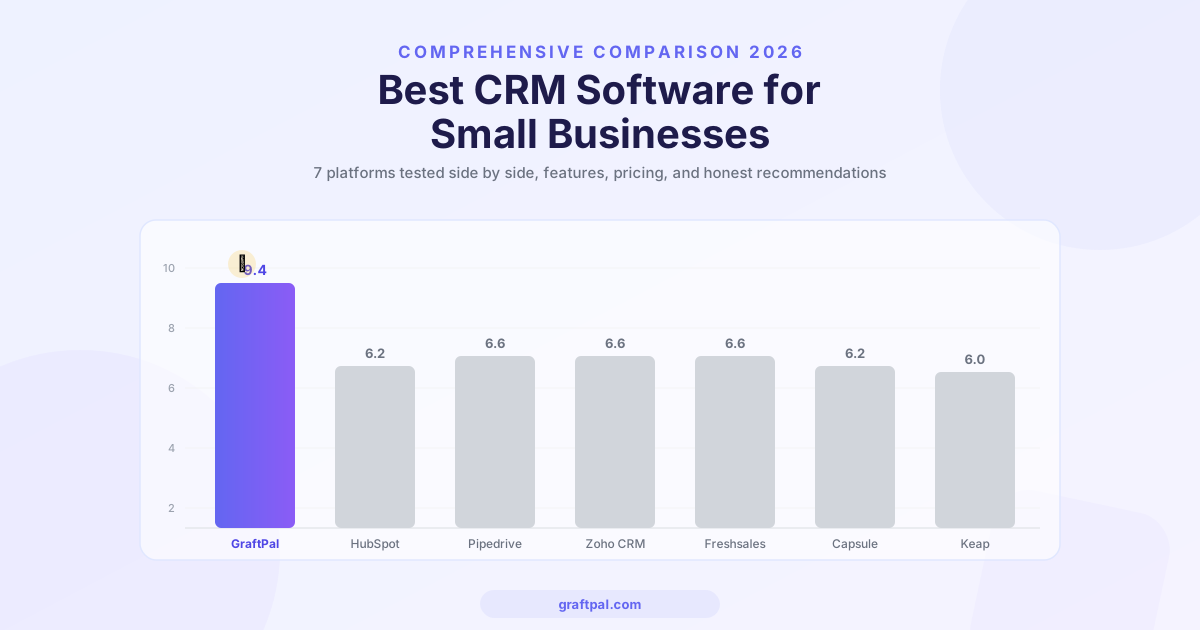
Best CRM Software for Small Businesses in 2026 (Compared)
We compared the top CRM platforms for small businesses side by side. See why GraftPal leads the pack with built-in proposals, invoicing, and automation, all at a price small teams can afford.

Zoho CRM Alternatives: 5 Better CRMs for Service Businesses in 2026
Looking for a Zoho CRM alternative? Compare the top 5 CRM platforms purpose-built for freelancers and service businesses, with honest feature comparisons, pricing, and recommendations.
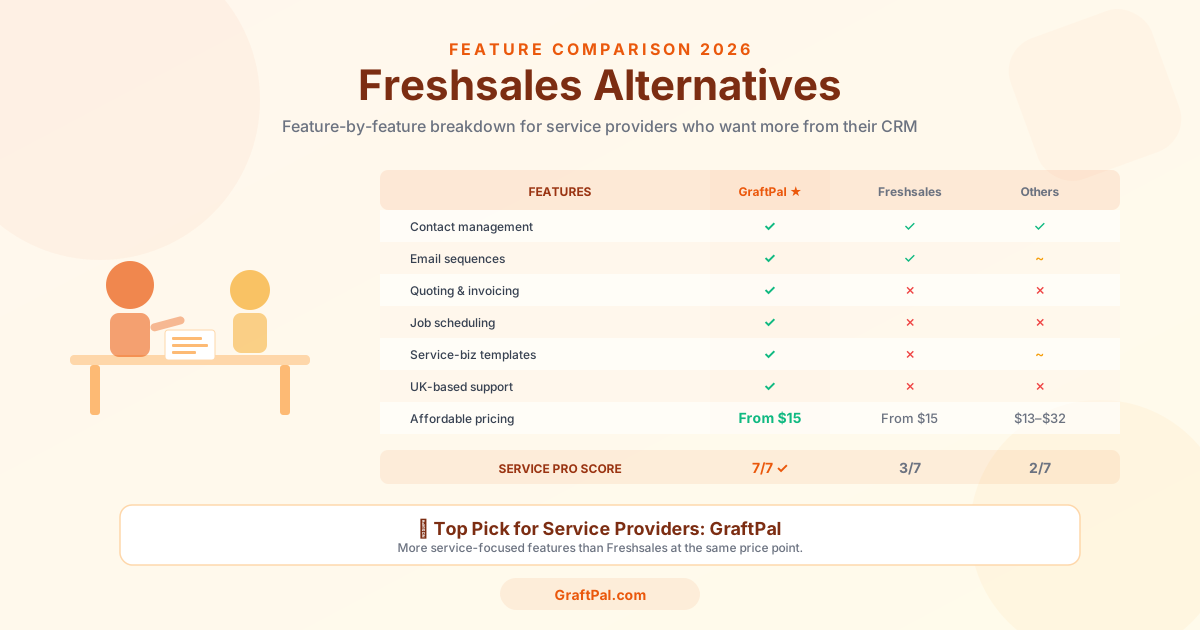
Freshsales Alternatives: 5 Best CRMs for Small Business Owners in 2026
Freshsales is powerful but built for tech-first sales teams, not service businesses. Discover the 5 best Freshsales alternatives for small business owners in 2026, compared by price, features, and fit for freelancers and service providers.
Ready to Run Your Business From One AI-Powered Platform?
Join thousands of freelancers, consultants, and service businesses who replaced their tool stack with GraftPal. One platform. One login. Everything connected, with AI built in.