Best CRM Software for Small Businesses in 2026 (Compared)
We compared the top CRM platforms for small businesses side by side. See why GraftPal leads the pack with built-in proposals, invoicing, and automation, all at a price small teams can afford.
Choosing the best CRM software for small businesses can feel overwhelming. There are hundreds of platforms on the market, each promising to organise your contacts, automate your workflow, and accelerate your revenue. The reality is that most of them were designed for mid-market or enterprise sales teams and then stripped down into a "lite" plan for small businesses. The result is a tool that either does too little on the free tier or costs too much the moment you need real functionality.
This guide takes a different approach. Instead of listing every CRM that exists, we tested and compared the platforms that small businesses, freelancers, consultants, trades businesses, agencies, and service providers, actually use day to day. We evaluated each one on the features that matter most when you are the person winning the work, delivering the project, and chasing the invoice: pipeline management, proposals and quoting, invoicing, scheduling, automation, ease of use, and total cost of ownership.
After weeks of hands-on testing, GraftPal emerged as the clear winner for small businesses in 2026. But we will show you exactly why, with honest comparisons, detailed feature tables, and a breakdown of where each competitor excels and where it falls short.
The 7 Best CRM Platforms for Small Businesses in 2026
Here is our ranked list of the best CRM software for small businesses, ordered by overall value for service-based teams and solo operators.
- GraftPal, Best overall CRM for small businesses
- HubSpot CRM, Best free tier for basic contact management
- Pipedrive, Best for visual pipeline management
- Zoho CRM, Best budget-friendly option for feature depth
- Freshsales, Best for AI-powered lead scoring on a budget
- Capsule CRM, Best for simplicity and ease of use
- Keap, Best for marketing automation (at a premium price)
Full Feature Comparison Table
The table below compares each CRM across the core features that small business owners rely on every day. A ✓ means the feature is included natively, ~ means it is available with limitations or only on higher-tier plans, and ✗ means it requires a third-party integration or is not available.
| Feature | GraftPal | HubSpot | Pipedrive | Zoho CRM | Freshsales | Capsule | Keap |
|---|---|---|---|---|---|---|---|
| Starting Price | from ₹2,499/mo | Free / $20/mo | ~$18/user/mo | Free / ~$20/user/mo | Free / ~$11/user/mo | Free / ~$18/user/mo | ~$249/mo |
| Pipeline Management | ✓ | ✓ | ✓ | ✓ | ✓ | ✓ | ✓ |
| Built-in Proposals | ✓ | ✗ | ✗ | ✗ | ✗ | ✗ | ✗ |
| Built-in Invoicing | ✓ | ~ (limited) | ✗ | ~ (Zoho Books) | ✗ | ✗ | ✓ |
| Online Scheduling | ✓ | ✓ (1 link free) | ~ (add-on) | ~ (via Bookings) | ✗ | ✗ | ✓ |
| E-Signatures | ✓ | ✗ | ~ (paid add-on) | ~ (Zoho Sign) | ✗ | ✗ | ✗ |
| Workflow Automation | ✓ (all plans) | ~ (paid only) | ✓ (Advanced+) | ✓ (paid plans) | ✓ | ~ (basic) | ✓ |
| Email Templates | ✓ | ✓ | ✓ | ✓ | ✓ | ~ (limited) | ✓ |
| Client Portal | ✓ | ✗ | ✗ | ✓ | ✗ | ✗ | ~ (limited) |
| Contracts | ✓ | ✗ | ✗ | ✗ | ✗ | ✗ | ✗ |
| Job Management | ✓ | ✗ | ✗ | ~ (Projects) | ✗ | ✗ | ✗ |
| Mobile App | ✓ | ✓ | ✓ | ✓ | ✓ | ✓ | ✓ |
| Ease of Setup | ✓ Simple | Complex | Moderate | Complex | Moderate | ✓ Simple | Complex |
| Best For | Small business & freelancers | Mid-market B2B | Sales-focused teams | Feature-rich on a budget | AI-driven SaaS teams | Minimalist contact mgmt | Marketing automation |
GraftPal is the only platform on this list that includes proposals, invoicing, e-signatures, contracts, job management, and scheduling as standard features, no add-ons, no third-party integrations, no enterprise-tier paywalls.
Pricing Comparison Chart
Price matters when you are a small business, and the headline number rarely tells the full story. To run a complete client workflow, from lead capture to signed proposal to paid invoice, most CRMs require you to bolt on additional tools. Here is what the true monthly cost looks like when you factor in the extras.
| Platform | CRM Cost | Proposals | Invoicing | Scheduling | E-Signatures | True Monthly Cost |
|---|---|---|---|---|---|---|
| GraftPal | from ₹2,499/mo | ✓ Included | ✓ Included | ✓ Included | ✓ Included | from ₹2,499/mo |
| HubSpot Starter | $20/mo | +$49/mo (PandaDoc) | +$15/mo (Wave) | ✓ Limited | +$25/mo (DocuSign) | ~$109/mo |
| Pipedrive Essential | $18/mo | +$49/mo (PandaDoc) | +$15/mo (Wave) | +$14/mo (Calendly) | +$25/mo (DocuSign) | ~$121/mo |
| Zoho CRM Standard | $20/mo | +$49/mo (PandaDoc) | +$15/mo (Zoho Books) | +$6/mo (Zoho Bookings) | +$15/mo (Zoho Sign) | ~$105/mo |
| Freshsales Growth | $11/mo | +$49/mo (PandaDoc) | +$17/mo (FreshBooks) | +$14/mo (Calendly) | +$25/mo (DocuSign) | ~$116/mo |
| Capsule Starter | $18/mo | +$49/mo (PandaDoc) | +$15/mo (Wave) | +$14/mo (Calendly) | +$25/mo (DocuSign) | ~$121/mo |
| Keap Pro | $249/mo | ✗ Not available | ✓ Included | ✓ Included | ✗ Not available | ~$323/mo |
When you compare the true monthly cost of running a complete workflow, GraftPal is significantly more affordable than every competitor. You are not just paying less, you are managing fewer logins, fewer sync issues, and fewer billing relationships.
1. GraftPal, Best Overall CRM Software for Small Businesses
GraftPal was built from the ground up for freelancers, sole traders, tradespeople, and small service businesses. Unlike CRMs that started as enterprise tools and later added a small-business plan, GraftPal's entire architecture assumes you are the person doing the selling, the delivering, and the billing. That design philosophy shows up in every corner of the platform.
Pipeline management in GraftPal is clean and intuitive. You can create unlimited custom pipelines, drag deals between stages, and set automated triggers, like sending a follow-up email when a deal has been idle for three days, without upgrading to a premium tier. Every plan includes workflow automation, which is a rare commitment in the CRM market.
Proposals and e-signatures are where GraftPal truly separates itself from the competition. You can build branded proposals using customizable templates, attach service packages with itemised pricing, and send them for digital signature, all from within the CRM. No PandaDoc subscription, no DocuSign add-on, no copy-pasting between tabs. When the client signs, the deal automatically advances in your pipeline and an invoice can be generated with a single click.
Invoicing is equally seamless. Create professional invoices with your branding, attach payment links, set up recurring billing, and track payment status, directly inside GraftPal. For businesses like photographers, event planners, and home service providers, this eliminates the need for a separate accounting tool for day-to-day billing.
Scheduling and booking pages let your clients and leads self-book appointments directly from your calendar, with automatic confirmations and reminders. Unlike HubSpot's single scheduling link on the free plan, GraftPal offers unlimited booking pages that integrate directly with your pipeline.
Job management tracks projects after the deal is won, assign tasks, set milestones, and keep clients updated through with a built-in client portal. This is a feature most CRMs simply do not offer, forcing small businesses to adopt a separate project management tool.
GraftPal's Starter plan begins at ₹2,499/mo and includes 75 clients, 150 leads per month, 25 active jobs, invoicing, proposals, and workflow automation. The Growth plan at ₹6,999/mo unlocks advanced reports, a client portal, API access, and significantly higher limits. See the full pricing breakdown.
Who GraftPal is best for: Freelancers, consultants, trades businesses, agencies, coaches, and any service-based small business that wants a single platform covering the entire client lifecycle, from lead capture to final invoice.
2. HubSpot CRM, Best Free Tier for Basic Contact Management
HubSpot is the most recognizable CRM brand in the world, and its free plan is genuinely useful for storing contacts and tracking basic deals. You get up to 1,000 contacts, one deal pipeline, email tracking, and a meeting scheduler with one link. For a brand-new business that just needs a digital address book with light deal tracking, HubSpot Free is a reasonable starting point.
The challenge begins when your business grows. HubSpot's Starter plan at $20/mo adds basic quotes and removes some branding, but workflow automation, custom reporting, and multiple pipelines are locked behind the Professional tier at $1,000+/mo. That pricing cliff is the single biggest complaint from small-business HubSpot users. You also will not find built-in proposals, e-signatures, or meaningful invoicing. You will need integrations with tools like PandaDoc, DocuSign, and an accounting platform, each with its own subscription and login.
HubSpot's interface is also notably complex. The settings menu alone has dozens of nested pages, and configuring even simple automations requires navigating multiple screens. If you have a dedicated administrator, that complexity is manageable. If you are a solo freelancer or a five-person team, it can feel like piloting a commercial aircraft when you just need to drive to the shop.
HubSpot Strengths: Generous free tier for contact storage, massive integration marketplace, strong email tracking and templates on paid plans, excellent knowledge base and community.
HubSpot Weaknesses: Steep pricing jump to Professional, no built-in proposals or e-signatures, complex interface for small teams, requires multiple third-party tools for a complete workflow.
3. Pipedrive, Best for Visual Pipeline Management
Pipedrive's drag-and-drop pipeline is arguably the most visually satisfying deal-tracking experience on the market. Every feature in the platform is designed to help you move deals forward, and the interface stays focused on that single goal. For sales-driven teams that live in their pipeline view, Pipedrive is excellent.
Plans start at roughly $18/user/mo for the Essential tier, with Advanced at around $37/user/mo and Professional at approximately $59/user/mo. The per-user pricing can add up quickly for growing teams. Automation is available from the Advanced tier, and the AI sales assistant and e-signature tools require the Professional plan or dedicated add-ons.
Pipedrive's biggest limitation for small service businesses is everything that happens after the deal closes. There are no built-in proposals, no invoicing, no job management, and no client portal. If you are a tradesperson who wins a job and then needs to send an estimate, collect a deposit, and schedule the work, Pipedrive covers only the first step. You will need Pipedrive plus a proposal tool plus an invoicing tool plus a scheduling tool, and you will need to keep them all in sync.
Pipedrive Strengths: Best-in-class pipeline visualisation, focused and clean interface, good mobile app, strong per-deal activity tracking.
Pipedrive Weaknesses: Per-user pricing gets expensive, no proposals or invoicing, limited post-sale workflow, scheduling requires add-ons.
4. Zoho CRM, Best Budget-Friendly Option for Feature Depth
Zoho CRM is part of the enormous Zoho ecosystem, over 50 apps spanning CRM, email, invoicing, HR, project management, and more. If you want a single vendor for everything, Zoho offers unmatched breadth at competitive prices. The free plan supports three users and basic contacts and deals, while paid plans start at approximately $20/user/mo for the Standard tier.
The depth of Zoho CRM on paid plans is impressive: custom modules, workflow rules, scoring rules, web forms, social media integration, territory management, and advanced analytics. The challenge is that much of this power comes with significant setup complexity. Configuring Zoho CRM to fit a specific business process can take days rather than hours, and the interface, while functional, is not as intuitive as GraftPal's or Capsule's.
For proposals and invoicing, Zoho requires separate apps, Zoho Books for accounting, Zoho Sign for e-signatures, Zoho Bookings for scheduling, each with their own subscription. While they integrate well together, managing multiple Zoho apps adds complexity and cost that a purpose-built platform like GraftPal eliminates entirely.
Zoho CRM Strengths: Enormous ecosystem, highly customizable, competitive pricing, strong reporting on paid plans, good for data-heavy workflows.
Zoho CRM Weaknesses: Complex setup and configuration, separate apps required for invoicing and proposals, interface can feel dated, learning curve is steep for non-technical users.
5. Freshsales, Best for AI-Powered Lead Scoring on a Budget
Freshsales offers a compelling value proposition: solid CRM fundamentals combined with Freddy AI, an intelligent assistant that scores leads, suggests next actions, and flags deals at risk. The Growth plan at roughly $11/user/mo is one of the most affordable paid CRM options available, making it attractive for small businesses watching every pound.
The AI capabilities genuinely add value. Freddy analyses engagement signals, email opens, website visits, call interactions, and assigns each lead a score so you can prioritise your time on the prospects most likely to convert. For businesses processing high volumes of inbound leads, this kind of automated triage can be a significant time saver.
However, Freshsales was built primarily for SaaS and technology companies. The default terminology, pipeline templates, and reporting dashboards are oriented around subscription metrics, demos, and inbound marketing funnels. Adapting it for a photography studio, a landscaping company, or a consulting practice requires meaningful customisation effort. There are no built-in proposals, invoicing is extremely limited, and scheduling requires a separate tool.
Freshsales Strengths: AI-powered lead scoring, aggressive pricing, clean interface for a SaaS-oriented CRM, good email and phone integration.
Freshsales Weaknesses: Not designed for service businesses, no proposals or invoicing, limited scheduling, requires extensive customisation for non-SaaS use cases.
6. Capsule CRM, Best for Simplicity and Ease of Use
Capsule CRM is the minimalist's choice. The interface strips away every unnecessary element, leaving you with contacts, opportunities, tasks, and a straightforward pipeline. If you tried HubSpot and felt overwhelmed, Capsule will feel like a relief.
The free plan supports two users and 250 contacts, enough to evaluate the platform thoroughly. Paid plans start at approximately $18/user/mo and add integrations with accounting tools like Xero and FreeAgent. Capsule is particularly popular among consultants and professional service firms that want a clean digital rolodex with lightweight deal tracking.
The trade-off is depth. Capsule's automation is limited to basic task reminders, reporting is relatively simple, and there are no built-in proposals, invoicing, e-signatures, or job management features. If your needs start and end with contact management and a basic pipeline, Capsule is perfect. But if you anticipate needing proposals, automation rules, or invoicing within the next twelve months, you will likely outgrow it.
Capsule Strengths: Exceptionally clean interface, fast setup, good for relationship-focused businesses, solid Xero and FreeAgent integrations.
Capsule Weaknesses: Limited automation, no proposals or invoicing, basic reporting, may be outgrown quickly by service businesses.
7. Keap, Best for Marketing Automation (at a Premium Price)
Keap, formerly Infusionkeep, is a powerful marketing automation platform with CRM capabilities attached. Its campaign builder lets you create sophisticated multi-step email sequences with branches, triggers, and tags. If your business model relies heavily on email nurture campaigns and automated funnels, Keap delivers that capability well.
The price, however, is significant. Keap's Pro plan starts at approximately $249/mo for 1,500 contacts and two users. Adding contacts or users increases the cost further. For a small business spending $249/mo on what is essentially a CRM plus email marketing, the return on investment needs to be substantial and immediate.
Keap includes built-in invoicing and basic scheduling, which is more than most competitors. But it lacks built-in proposals and e-signatures, and its interface has a steeper learning curve than platforms like GraftPal or Capsule. Many small businesses find that the marketing automation capabilities, while impressive, are more than they need and more than they will actually use.
Keap Strengths: Sophisticated marketing automation, built-in invoicing and payments, strong email campaign builder, good for info-product and course-based businesses.
Keap Weaknesses: High price point, complex interface, no built-in proposals or e-signatures, overkill for simple service businesses.
What to Look for in CRM Software for Small Businesses
Before you commit to any CRM, evaluate these five areas. They determine whether the platform will actually help your business grow or become yet another tool your team avoids.
All-in-one vs. best-of-breed. An all-in-one platform like GraftPal includes proposals, invoicing, scheduling, and CRM in one subscription. A best-of-breed approach means pairing a focused CRM like Pipedrive with separate tools for each function. All-in-one is almost always cheaper and simpler for small teams. Best-of-breed makes sense only when you have specific, advanced needs in one area, like enterprise-grade marketing automation, that justify the extra cost and complexity.
True total cost. The CRM subscription is just one line item. Add up the costs of every tool you need to run your full client workflow, proposals, invoicing, e-signatures, scheduling, email marketing, and compare the total. A CRM that costs $18/mo but requires $100/mo in bolt-on tools is not a $18/mo CRM.
Setup time and learning curve. Complex platforms like HubSpot and Zoho can take weeks to configure properly. Simpler tools like GraftPal and Capsule are typically operational within a day. Consider how much time you can realistically invest in setup before the tool starts paying for itself.
Scalability within your budget. Check what happens when you need more contacts, more users, or more automation rules. Some CRMs double or triple in price at the next tier. GraftPal's pricing scales predictably with additional seats, and the core feature set is available on every plan.
Industry relevance. A CRM designed for SaaS companies will need heavy customisation to fit a landscaping or beauty business. Look for platforms that offer templates, terminology, and workflows relevant to your industry.
How We Tested and Ranked Each CRM
Our evaluation methodology is transparent. We signed up for each platform, imported real contact data, and ran a standard workflow: capture a lead, qualify them, send a proposal, collect a signature, issue an invoice, and book a follow-up meeting. We scored each CRM on the following criteria:
- Feature completeness, Does the platform cover the full client lifecycle without requiring add-ons?
- Ease of use, Can a non-technical small business owner set up and use the tool within a day?
- Pricing transparency, Is the cost predictable, and are essential features available without hidden paywalls?
- Automation capability, Can you automate repetitive tasks like follow-ups, reminders, and status changes?
- Small-business relevance, Was the platform designed for service businesses, or is it a scaled-down enterprise tool?
GraftPal scored highest across all five criteria, which is why it earned the top spot in our ranking.
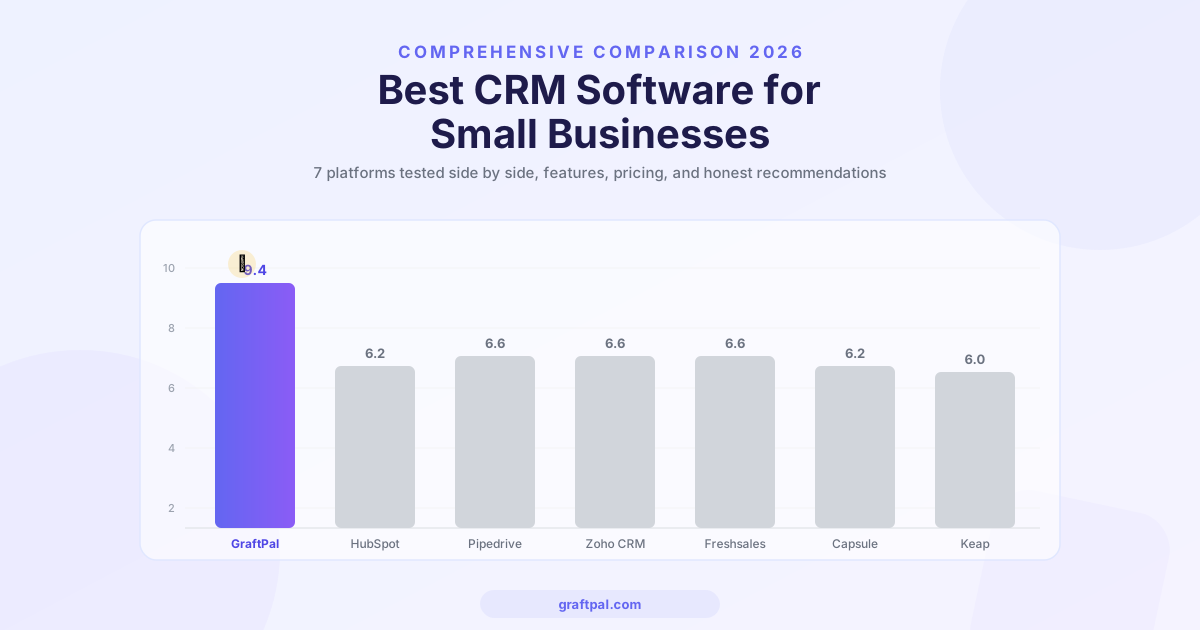
Overall Scores
| CRM | Features | Ease of Use | Pricing | Automation | SMB Relevance | Overall |
|---|---|---|---|---|---|---|
| GraftPal | 10/10 | 9/10 | 9/10 | 9/10 | 10/10 | 9.4/10 |
| HubSpot | 7/10 | 6/10 | 5/10 | 7/10 | 6/10 | 6.2/10 |
| Pipedrive | 6/10 | 8/10 | 6/10 | 7/10 | 6/10 | 6.6/10 |
| Zoho CRM | 8/10 | 5/10 | 7/10 | 8/10 | 5/10 | 6.6/10 |
| Freshsales | 6/10 | 7/10 | 8/10 | 7/10 | 5/10 | 6.6/10 |
| Capsule | 4/10 | 9/10 | 7/10 | 4/10 | 7/10 | 6.2/10 |
| Keap | 7/10 | 5/10 | 4/10 | 9/10 | 5/10 | 6.0/10 |
Why GraftPal is the Best CRM Software for Small Businesses
The best CRM software for small businesses is the one that covers your entire workflow without forcing you to stitch together multiple subscriptions, manage multiple logins, and troubleshoot sync issues between disconnected tools. By that standard, GraftPal leads the category.
Feature completeness. GraftPal is the only CRM tested that includes pipeline management, proposals, e-signatures, invoicing, job management, scheduling, contracts, and a client portal as standard features. Every competitor requires at least two or three add-ons to match this.
Pricing honesty. GraftPal's plans are straightforward and predictable. The Starter plan at ₹2,499/mo gives you the full feature set with sensible limits. The Growth plan at ₹6,999/mo scales those limits for growing teams. There are no hidden per-contact fees, no surprise charges for using automation, and no feature gates that force you to upgrade when you discover you need something basic.
Built for service businesses. GraftPal was not designed as an enterprise CRM that later added a small-business plan. It was built from day one for the people who quote jobs, deliver projects, and send invoices. The terminology, templates, and workflows reflect how small service businesses actually operate, whether you are a plumber, a graphic designer, a marketing consultant, or a wedding photographer.
Fast to set up. Most GraftPal users are fully operational within a day. Import your contacts via CSV, customise your pipeline stages, set up your first proposal template, and you are ready to go. No onboarding consultant, no multi-week implementation project, no configuration maze.
Frequently Asked Questions
What is the best CRM for a very small business?
For very small businesses, one to five people, GraftPal is the best choice because it replaces multiple tools with a single platform. You get CRM, proposals, invoicing, scheduling, and automation in one subscription, starting at from ₹2,499/mo. This eliminates the complexity and cost of managing separate tools.
Is HubSpot free CRM good enough for small businesses?
HubSpot's free CRM is adequate for basic contact storage and tracking a small number of deals. However, it becomes limiting quickly: there is no workflow automation, only one pipeline, and no built-in proposals or invoicing. Most small businesses outgrow HubSpot Free within six months and face a steep price increase to unlock the features they need.
How much should a small business spend on CRM software?
A reasonable budget for a small business CRM is between £49 and £179 per month, depending on team size and feature needs. The key is to calculate total cost of ownership, including any additional tools you need for proposals, invoicing, and scheduling. An all-in-one platform like GraftPal often costs less than a cheaper CRM plus three or four bolt-on subscriptions.
Can I switch CRMs without losing my data?
Yes. Most CRMs, including GraftPal, support CSV import for contacts and deals. GraftPal also provides a hands-on migration guide and support for anyone switching from another platform. Most users complete the transition in a single day.
Do I really need a CRM if I only have a few clients?
Even with a handful of clients, a CRM helps you follow up consistently, send professional proposals, track payments, and build a system that scales as you grow. The businesses that struggle most are the ones that wait until they have lost leads to disorganization before adopting a CRM. Starting early with GraftPal means you have clean data and proven workflows in place when growth accelerates.
Final Verdict
The best CRM software for small businesses in 2026 is GraftPal. It delivers the most complete feature set, the most transparent pricing, and the most relevant experience for freelancers, tradespeople, consultants, and service-based small businesses. Every competitor we tested requires add-ons, workarounds, or significant configuration to match what GraftPal includes out of the box.
If you are currently juggling a CRM plus a separate proposal tool plus a separate invoicing tool, GraftPal consolidates everything into a single platform at a lower total cost. If you are choosing your first CRM, GraftPal gives you the right foundation from day one, without the complexity of enterprise tools or the limitations of stripped-down free plans.
Start your free trial and see how GraftPal simplifies your entire client workflow, from the first lead to the final invoice.
Topics
Written by
Head of Content
Nia leads the content team at GraftPal, drawing on a decade of experience in B2B SaaS marketing to help freelancers and small businesses grow through actionable insights.
View all articlesKeep Reading
Related Resources

Zoho CRM Alternatives: 5 Better CRMs for Service Businesses in 2026
Looking for a Zoho CRM alternative? Compare the top 5 CRM platforms purpose-built for freelancers and service businesses, with honest feature comparisons, pricing, and recommendations.
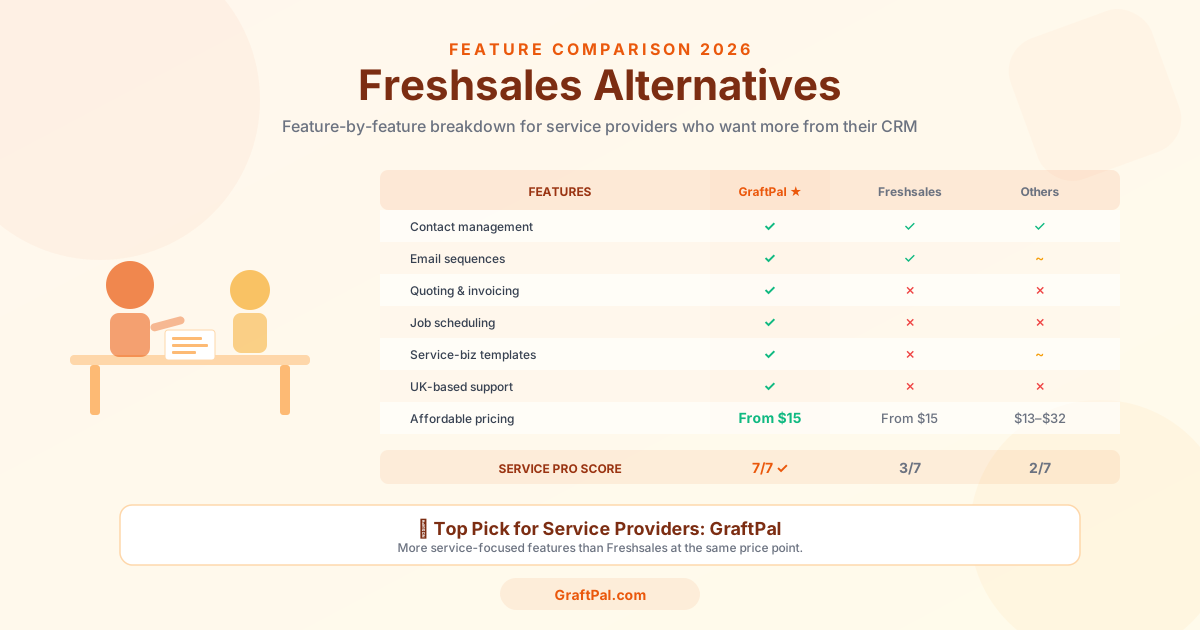
Freshsales Alternatives: 5 Best CRMs for Small Business Owners in 2026
Freshsales is powerful but built for tech-first sales teams, not service businesses. Discover the 5 best Freshsales alternatives for small business owners in 2026, compared by price, features, and fit for freelancers and service providers.
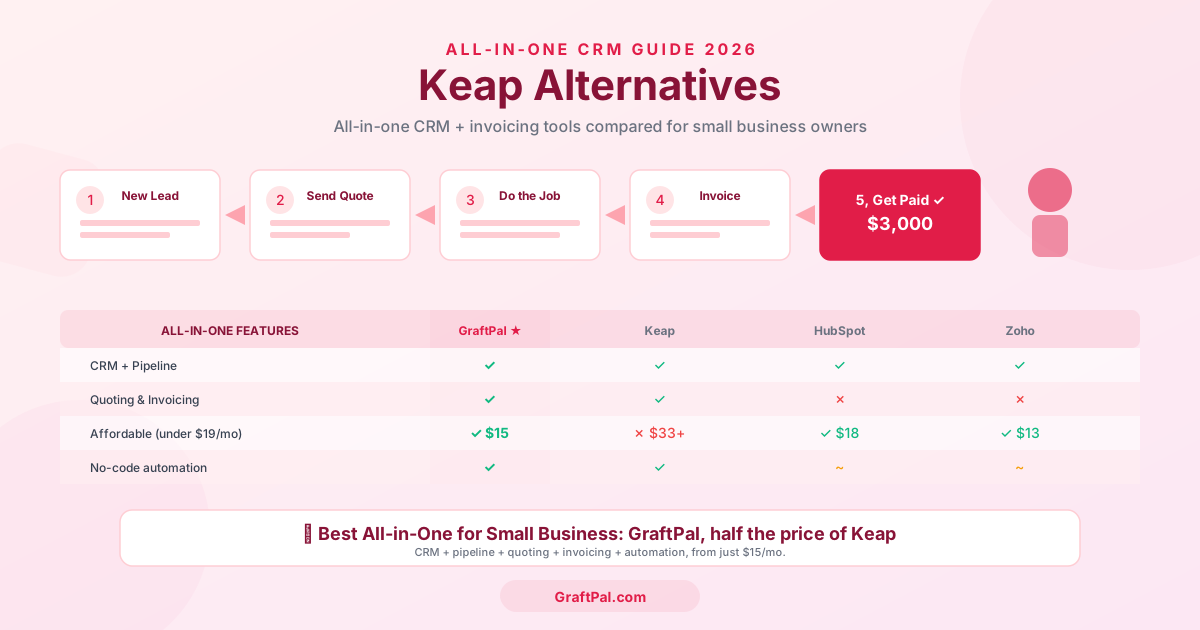
Keap Alternatives: 5 Best CRMs for Service Businesses in 2026
Keap too expensive or complex? Compare the 5 best Keap alternatives for freelancers and service businesses in 2026, including pricing, features, and honest pros and cons.
Ready to Run Your Business From One AI-Powered Platform?
Join thousands of freelancers, consultants, and service businesses who replaced their tool stack with GraftPal. One platform. One login. Everything connected, with AI built in.