The Complete CRM Buyer's Guide
Everything you need to know before investing in a CRM, features to prioritise, questions to ask vendors, and mistakes to avoid.
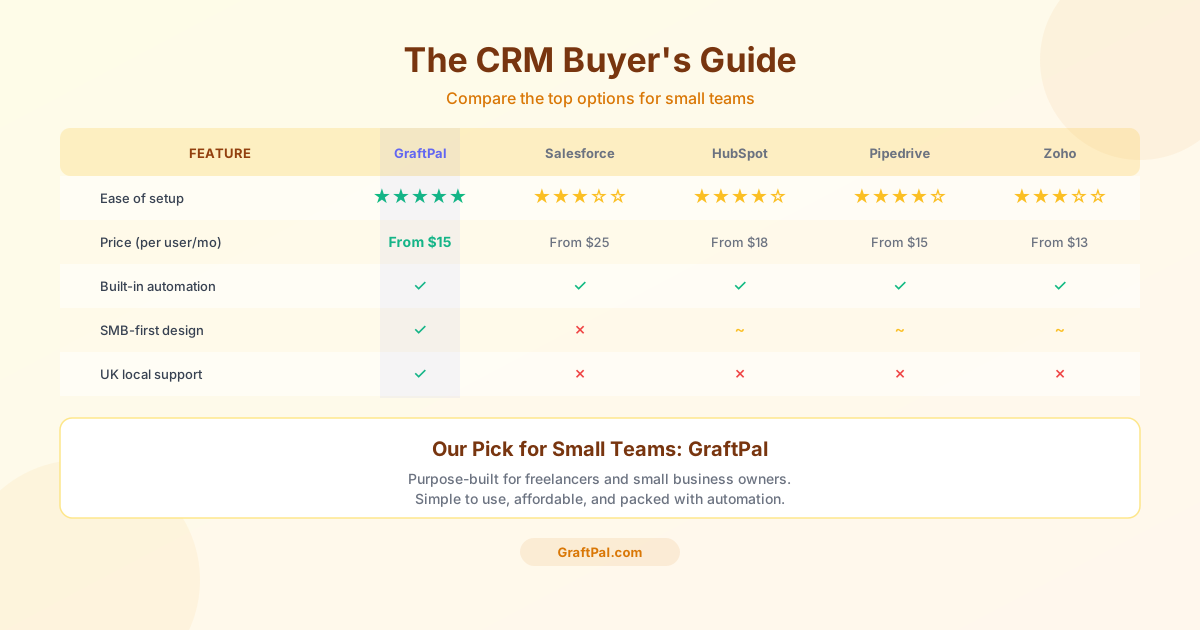
Choosing a CRM is one of the most consequential technology decisions a small business can make. The right tool accelerates growth by organizing your relationships, automating repetitive tasks, and giving you visibility into your revenue pipeline. The wrong tool wastes money, frustrates your team, and often ends up abandoned within six months. This guide is designed to help you make the right choice the first time.
Map Your Current Process
Start by mapping your current process before you evaluate any software. Write down every step that happens between a new lead arriving and a deal closing, or being lost. Note where information lives today, who touches each step, and where delays or errors occur most often. This exercise gives you a concrete requirements list instead of a vague wish list, and it prevents you from being swayed by flashy features you'll never use.
Five Core Areas to Compare
When comparing CRM platforms, focus on five core areas: contact management, pipeline tracking, communication logging, reporting, and integrations. Contact management should let you store custom fields relevant to your business, not just name and email. Pipeline tracking needs to match your actual sales stages, not force you into a generic funnel. Communication logging should automatically capture emails and calls so you never have to wonder what was said last. Reporting should answer your two most important questions, how much revenue is in the pipeline and what's my win rate, without requiring a data science degree. And integrations should connect to the tools you already use, especially your email provider and calendar.
Understanding Pricing Models
Pricing models vary widely, so look beyond the headline number. Some CRMs charge per user, which becomes expensive as your team grows. Others charge based on the number of contacts, which can spike unexpectedly if you import a large list. GraftPal uses straightforward per-seat pricing with no contact limits, so your costs stay predictable as your database grows.
Use the Trial Period
Finally, don't skip the trial period. Use it to enter real data, run your actual workflow, and involve anyone on your team who will use the tool daily. A CRM that feels intuitive during a guided demo can feel clunky when you're entering fifty leads on a Monday morning. The trial is your chance to find out before you commit.
Ready to see how GraftPal fits your specific industry? Browse our solutions by role and industry, from accounting and legal services to photography and event planning.
Topics
Written by
Head of Content
Nia leads the content team at GraftPal, drawing on a decade of experience in B2B SaaS marketing to help freelancers and small businesses grow through actionable insights.
View all articlesKeep Reading
Related Resources
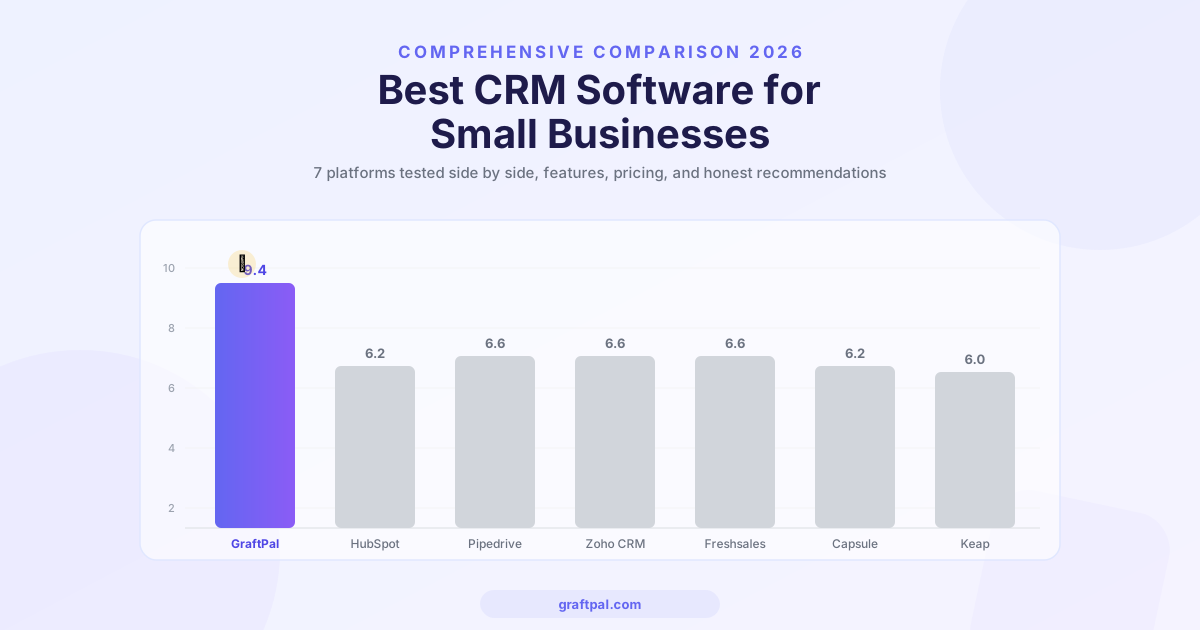
Best CRM Software for Small Businesses in 2026 (Compared)
We compared the top CRM platforms for small businesses side by side. See why GraftPal leads the pack with built-in proposals, invoicing, and automation, all at a price small teams can afford.

Zoho CRM Alternatives: 5 Better CRMs for Service Businesses in 2026
Looking for a Zoho CRM alternative? Compare the top 5 CRM platforms purpose-built for freelancers and service businesses, with honest feature comparisons, pricing, and recommendations.
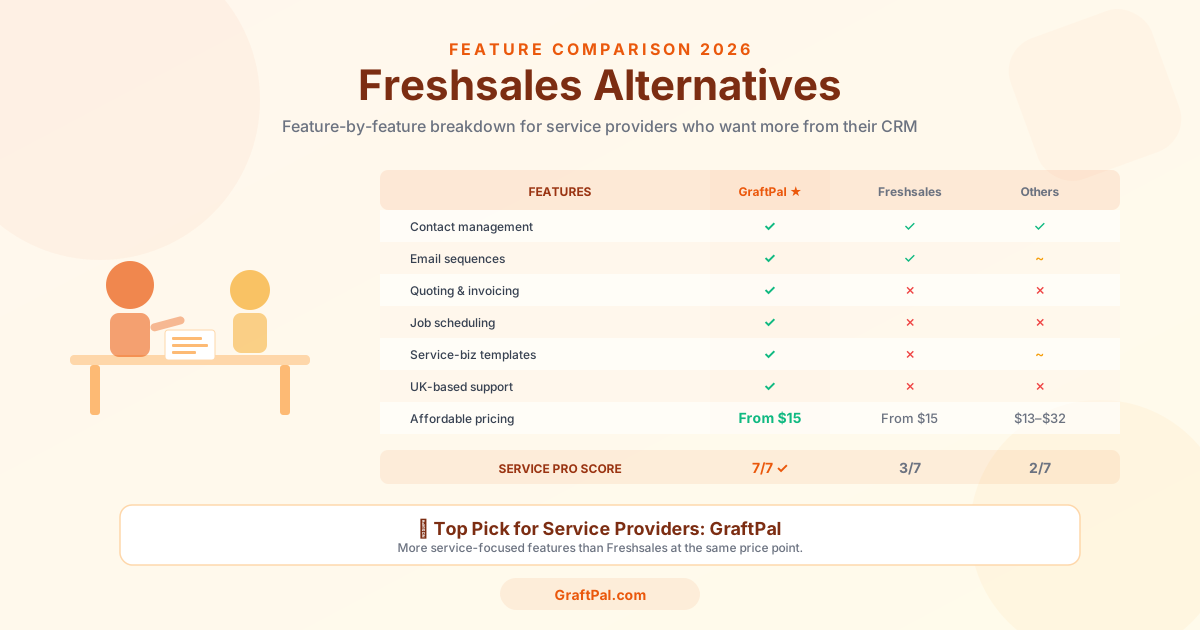
Freshsales Alternatives: 5 Best CRMs for Small Business Owners in 2026
Freshsales is powerful but built for tech-first sales teams, not service businesses. Discover the 5 best Freshsales alternatives for small business owners in 2026, compared by price, features, and fit for freelancers and service providers.
Ready to Run Your Business From One AI-Powered Platform?
Join thousands of freelancers, consultants, and service businesses who replaced their tool stack with GraftPal. One platform. One login. Everything connected, with AI built in.